The fude package provides utilities to facilitate the handling of the Fude Polygon data downloadable from the Ministry of Agriculture, Forestry and Fisheries (MAFF) website. The word “fude” is a Japanese counter suffix used to denote land parcels.
Obtain data
Fude Polygon data can now be downloaded from two different MAFF websites (both available only in Japanese):
GeoJSON format:
https://open.fude.maff.go.jpFlatGeobuf format:
https://www.maff.go.jp/j/tokei/census/shuraku_data/2025/mb/
Install the package
You can install the released version of fude from CRAN with:
install.packages("fude")Or the development version from GitHub with:
pak::pak("takeshinishimura/fude")Usage
Read Fude Polygon data
There are two ways to load Fude Polygon data, depending on how the data was obtained:
-
From a locally saved ZIP file:
This method works for both GeoJSON (from Obtaining Data #1) and FlatGeobuf (from Obtaining Data #2) formats. You can load a ZIP file saved on your computer without unzipping it.
-
By specifying a prefecture name or code:
This method is available only for FlatGeobuf data (from Obtaining Data #2). Provide the name of a prefecture (e.g., “愛媛”) or its corresponding prefecture code (e.g., “38”), and the required FlatGeobuf format ZIP file will be automatically downloaded and loaded.
d2 <- read_fude(pref = "愛媛")
# d2 <- read_fude("~/MB0001_2026_2025_38.zip.001")
Merging ZIP Files
Since the 2026 release, Fude Polygon data provided by the MAFF have been distributed as split ZIP archives (e.g., .zip.001, .zip.002, and .zip.003).
After downloading all parts of the archive, you can merge them into a single ZIP file using the following function:
merge_split_zip("~/MB0001_2026_2025_38.zip.001", output_dir = "~")
#> Merging: MB0001_2026_2025_38.zip.001
#> Merging: MB0001_2026_2025_38.zip.002
#> Merging: MB0001_2026_2025_38.zip.003
#> Merging: MB0001_2026_2025_38.zip.004
#> Merging: MB0001_2026_2025_38.zip.005
#> Merge complete: ~/MB0001_2026_2025_38.zip
Get agricultural community boundary data
Download the agricultural community boundary data, which corresponds to the Fude Polygon data, from the MAFF website: https://www.maff.go.jp/j/tokei/census/shuraku_data/2025/ma/ (available only in Japanese).
b <- get_boundary(d)Combine Fude Polygons with agricultural community boundaries
You can easily combine Fude Polygons with agricultural community boundaries to create enriched spatial analyses or maps.
library(ggplot2)

db <- combine_fude(d2, b, city = "松山市", rcom = "由良|北浦|鷲ケ巣|門田|馬磯|泊|御手洗|船越")

ggplot() +
  geom_sf(data = db$fude, aes(fill = rcom_name), alpha = .8) +
  guides(fill = guide_legend(reverse = TRUE, title = "興居島の集落別耕地")) +
  theme_void() +
  theme(legend.position = "bottom") +
  theme(text = element_text(family = "Hiragino Sans"))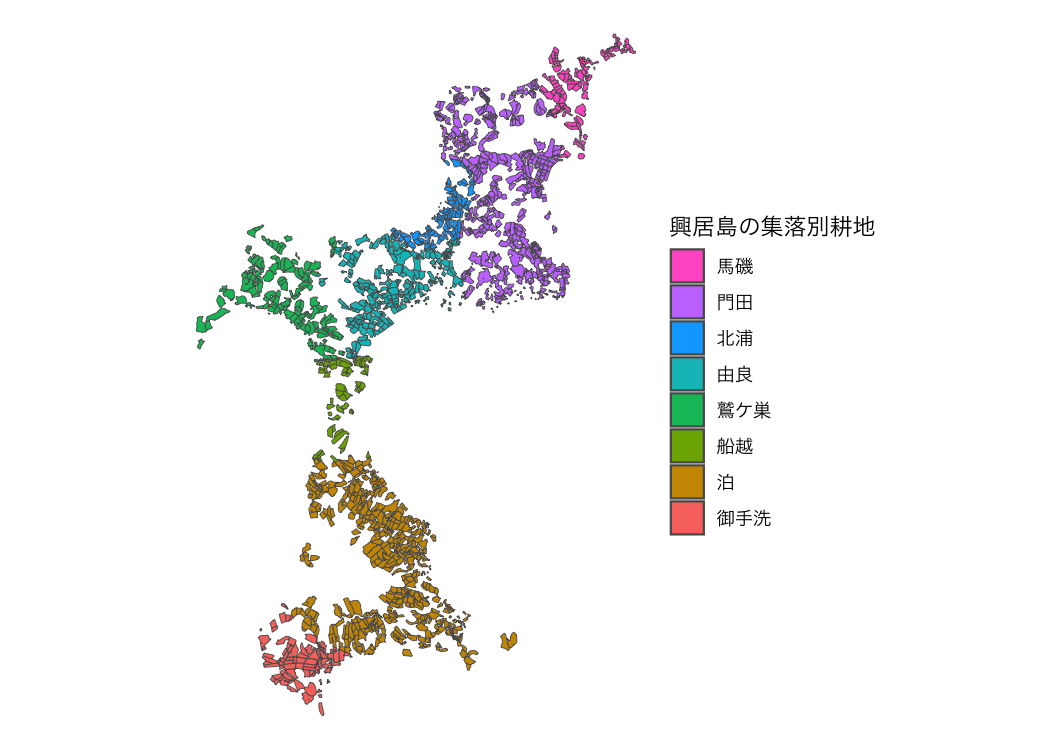
出典:農林水産省「筆ポリゴンデータ(2026年度公開)」および「農業集落境界データ(2025年度)」を加工して作成。
Data enables extraction based on municipality names, former municipality names, and agricultural community names.
Note: This feature is available only for data obtained from FlatGeobuf (Obtaining Data #2).
extract_fude(d2, city = "松山市", kcity = "興居島")
#> Simple feature collection with 1719 features and 6 fields
#> Geometry type: MULTIPOLYGON
#> Dimension:     XY
#> Bounding box:  xmin: 132.6373 ymin: 33.87055 xmax: 132.6991 ymax: 33.92544
#> Geodetic CRS:  JGD2000
#> # A tibble: 1,719 × 7
#>    polygon_uuid                   land_type issue_year point_lng point_lat key
#>  * <chr>                              <dbl>      <dbl>     <dbl>     <dbl> <chr>
#>  1 766414a4-b6a2-4e94-ad80-7a4c9…       200       2026      133.      33.9 3820…
#>  2 78e4815b-f4c1-46e4-bd73-fb335…       200       2026      133.      33.9 3820…
#>  3 f33d121f-23a2-48a5-9ba1-0b181…       200       2026      133.      33.9 3820…
#>  4 f09e31b1-6f08-49e1-9a87-e5fa1…       200       2026      133.      33.9 3820…
#>  5 73fe9c01-ca49-4e03-ad11-5c869…       200       2026      133.      33.9 3820…
#>  6 b67f6e44-1ed6-4e2a-b1ca-80fbe…       200       2026      133.      33.9 3820…
#>  7 dc3e607a-d3c7-46e5-a643-63281…       200       2026      133.      33.9 3820…
#>  8 4dfd0831-76ad-4404-abc2-53489…       200       2026      133.      33.9 3820…
#>  9 fcf27bd2-b2eb-47a4-86be-53d75…       200       2026      133.      33.9 3820…
#> 10 051fced3-b768-4d07-91d5-29e2b…       200       2026      133.      33.9 3820…
#> # ℹ 1,709 more rows
#> # ℹ 1 more variable: geometry <MULTIPOLYGON [°]>
Explore Fude Polygon data
You can explore Fude Polygon data interactively.
library(shiny)

s <- shiny_fude(db, rcom = TRUE)
# shinyApp(ui = s$ui, server = s$server)
Read data from the MAFF database
You can read data from the MAFF database (地域の農業を見て・知って・活かすDB).
library(dplyr)

b1 <- get_boundary(d2, path = "~", boundary_type = 1, quiet = TRUE)
# b2 <- get_boundary(d2, path = "~", boundary_type = 2, quiet = TRUE)
# b3 <- get_boundary(d2, path = "~", boundary_type = 3, quiet = TRUE)

m1 <- b1 |>
  read_ikasudb("~/IA0001_2023_2020_38.xlsx") |>
  mutate(
    地域類型1次分類 = factor(
      地域類型1次分類,
      levels = 1:4,
      labels = c("都市的地域", "平地農業地域", "中間農業地域", "山間農業地域")
    )
  )

ggplot() +
  geom_sf(data = m1, aes(fill = 地域類型1次分類)) +
  scale_fill_brewer(palette = "BuGn", na.translate = FALSE) +
  theme_void() +
  theme(text = element_text(family = "Hiragino Sans"))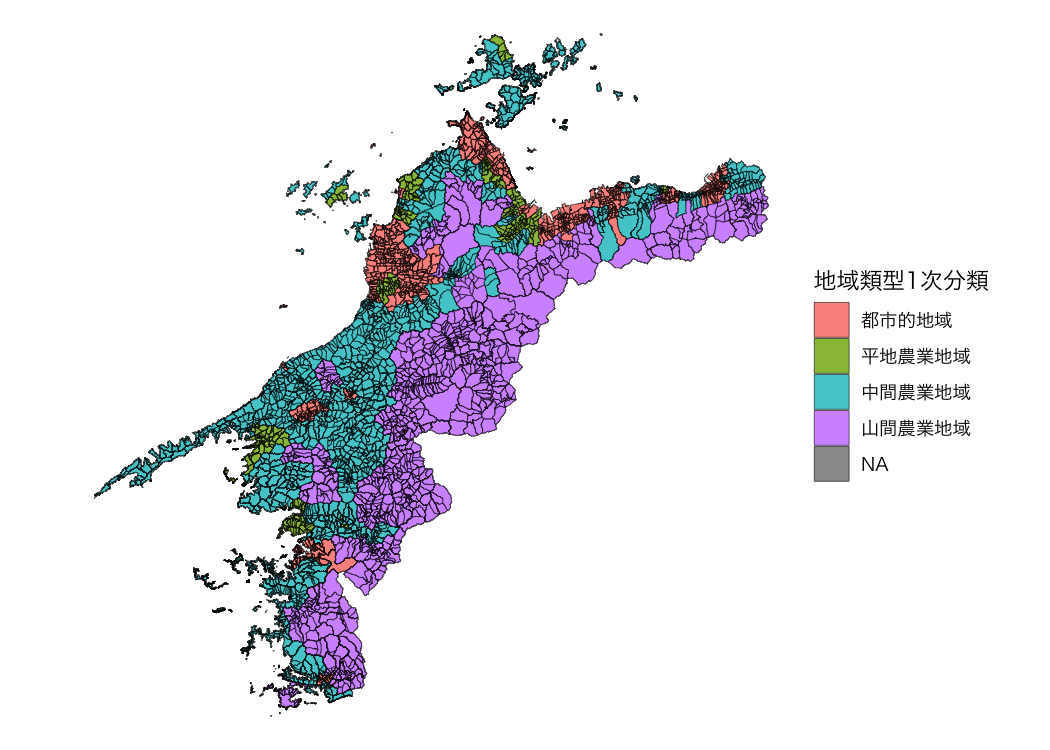
資料:農林水産省「農業集落境界データ(2025年度)」を加工して作成。